AI Mac Cleaner
Is a Mac Cleaner App Worth It?
Mac cleaners get mixed reviews online — some call them unnecessary, others say they free real space. Here's an honest look at when one actually helps, and what to check before trusting any of them.
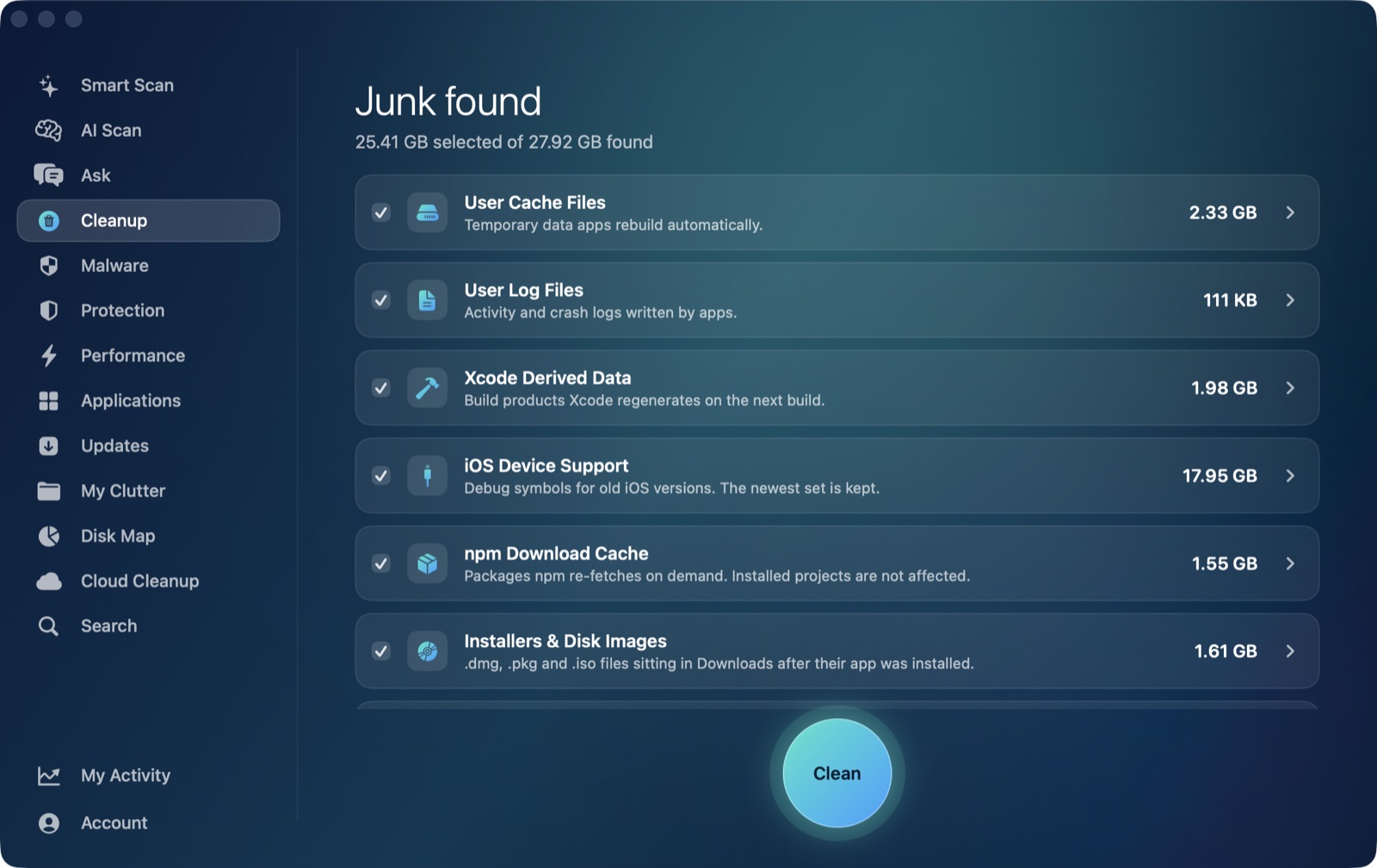
Search "is a mac cleaner app worth it" and you'll find a genuine, ongoing argument rather than a settled answer: some longtime Mac users insist macOS manages itself and a cleaner is a solution looking for a problem; others report real gigabytes recovered with no issues over months of use. Both sides have a point, and the honest answer depends less on the category of app and more on what any specific cleaner actually does before it touches a file. Here's that debate laid out plainly, and where AI Mac Cleaner actually lands in it.
The case against: "macOS already handles this"
The skeptical view, repeated across How-To Geek, SoftwareHow and other independent guides, boils down to three points: macOS's own Storage Management (Apple menu › About This Mac › Storage) already surfaces large files and lets you clear some caches yourself; a cleaner probably won't make a healthy Mac faster, since most slowdowns trace to RAM pressure, a failing drive or too many login items rather than clutter; and some cleaner apps have reputations — fair or not — for overpromising or being too aggressive with what they offer to delete (How-To Geek, SoftwareHow). Forum threads on Apple's own community site and MacRumors echo the same caution: several users there specifically warn against a well-known cleaner's older history of flagging files too broadly, and the top-voted answer on Apple's own forum calls a cleaner app unnecessary if you simply keep macOS updated and watch your own storage pane.
The case for: "it finds what you wouldn't think to look for"
The counterpoint shows up in the same threads. One long-running MacRumors poster reports recovering over 80GB using a cleaner daily for six months with no problems; another specifically notes that a cleaner only finds and lists files — it doesn't delete anything until you confirm — and says the real risk is a careless click, not the software itself. A separate guide (Mole) lands in the middle: not needed for routine maintenance, but genuinely useful for one specific job macOS's own tools don't do well — finding a sprawling hidden cache, or the leftover support files and containers an app leaves behind after you drag it to the Trash, which Apple's Storage pane doesn't surface at all.
That last point is the real answer hiding in this debate: the question isn't really "is the category worth it," it's "does this specific app only show you real, rebuildable junk, and does it ask before removing anything." That's a question about each cleaner's design, not about cleaners as a class.
Where AI Mac Cleaner actually stands
Rather than argue the category, here's what AI Mac Cleaner specifically does, since that's the part worth checking before trusting any cleaner with your files:
- Nothing is ever deleted outright. Every removal goes through one function,
FileRemover, which moves files to the macOS Trash. The only permanent deletion is Empty Trash, and you take that step yourself. - A hard-coded protected-path list keeps the app out of your home folder, Documents and iCloud Drive, regardless of what any scan finds there.
- Risky categories are review-only and never pre-ticked — iPhone backups, leftovers of apps you've already deleted, Docker's disk image, virtual machines, archives in Downloads, and
node_modulesfolders. You see the size; you decide. - Everything is listed with its size before anything happens. No category is cleaned blind.
- On-device AI, not a black box. AI Scan's explanations run on Apple's own FoundationModels, on your Mac — nothing is sent anywhere, and if Apple Intelligence isn't available it falls back to a clearly-labelled rule-based summary instead of pretending to be AI.
- Scanning stays free forever, with cleaning capped at 500MB total until you're on a paid plan ($6.99/month, $49.99/year or $199 lifetime for one Mac), and a 7-day free trial unlocks everything with no card required.
That answers the trust question the forums keep circling back to far better than a general "cleaners are fine" or "cleaners are a scam" verdict ever could — because both of those verdicts are true of some app in the category.
So: worth it, or not?
If you already use macOS's Storage pane regularly and your Mac feels fine, you probably don't need one. If you've got developer junk (Xcode DerivedData, npm cache, old iOS Device Support), app leftovers from software you uninstalled months ago, or you simply want to see what's actually in ~/Library/Caches before deciding what to do with it, a cleaner that lists before it touches anything is worth having installed — not run blindly on autopilot. See the full feature list or compare directly against named competitors in our CleanMyMac and MacKeeper write-ups.
Frequently asked questions
Will a Mac cleaner make my Mac faster?
Usually not by itself. Most slowdowns come from RAM pressure, a nearly-full drive, too many login items, or an aging drive — a cleaner helps most with the "nearly-full drive" part, not raw speed, unless storage pressure was the actual cause.
Are Mac cleaner apps safe to use?
It depends entirely on the specific app, not the category. Check whether it deletes to the Trash or outright, whether risky categories are pre-selected, and whether it shows you sizes before anything happens — AI Mac Cleaner does all three, and that's the checklist worth applying to any cleaner, not just this one.
What can't a Mac cleaner do that macOS's own Storage pane can?
It's mostly the reverse: Apple's Storage pane surfaces large files and some system recommendations, but it doesn't list app-by-app cache contents or leftover files from apps you've already deleted. That's the gap a cleaner that lists-before-touching actually fills.
Do I need a paid plan to try AI Mac Cleaner?
No — the 7-day free trial unlocks every feature with no card required, and scanning stays free forever afterward, with cleaning capped at 500MB total unless you're on a paid plan.
Is it better to clean manually or use an app?
Manually is fine if you know exactly where every cache and leftover lives and are willing to check regularly. An app that lists everything with its size before touching anything gets you the same result faster, provided — as the debate above shows — you actually read what it found before confirming.
Decide for yourself, risk-free. Start the free 7-day trial — every feature unlocked, no card required. Plans start at $6.99/mo (yearly $49.99, lifetime $199 for one Mac); see full pricing for the 2- and 5-Mac tiers.