 AI Mac Cleaner
: A DaisyDisk Alternative, Honestly Compared
Looking for a DaisyDisk alternative? A factual look at what DaisyDisk does well, its App Store limits, and how AI Mac Cleaner compares on price and features.
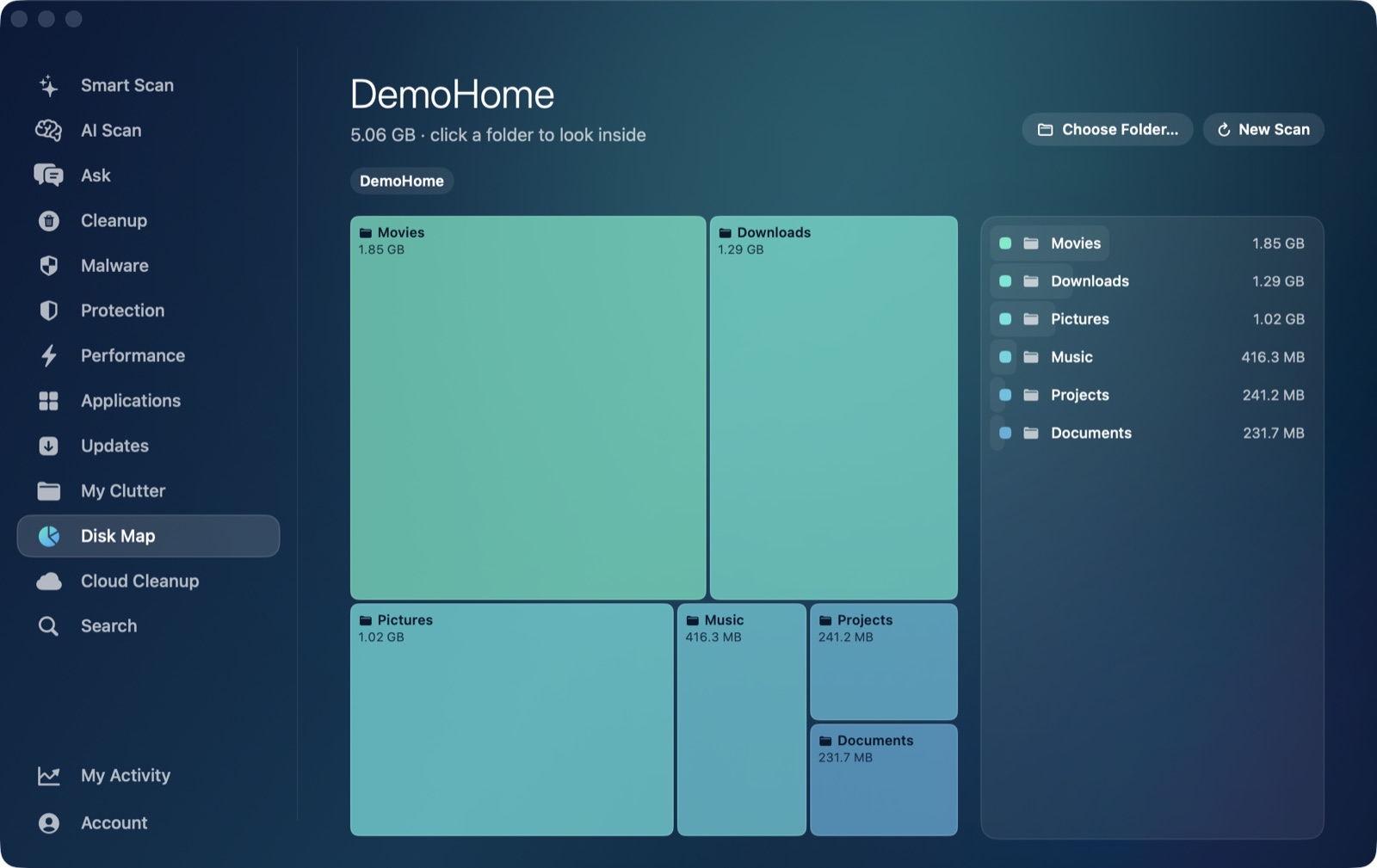
If you're looking for a DaisyDisk alternative, it's worth knowing upfront that DaisyDisk does one job well: drawing your disk as a visual map so you can see, at a glance, what's actually taking up space. It doesn't scan for junk categories, doesn't explain what it finds, and leaves every decision to you. Here's an honest comparison of what that means next to AI Mac Cleaner.
Quick answer: if you want a cleaner that automatically detects junk categories (caches, old installers, developer clutter, leftovers of deleted apps) and explains each one in plain language before anything moves to the Trash, that's AI Mac Cleaner. If you just want the clearest possible visual map of your disk and are comfortable deciding what to delete yourself, DaisyDisk is a genuinely good, cheap tool for exactly that.
What DaisyDisk actually does
DaisyDisk's whole product is its map: a set of concentric rings you drill into, sized by what's actually using space, so oversized folders and forgotten files jump out visually. It doesn't categorize anything as "cache" or "safe to remove" and has no AI or explanation layer of any kind — it shows you the shape of your disk, and the judgment call is yours.
AI Mac Cleaner has the same kind of tool built in — Disk Map draws a squarified treemap of your whole disk or any folder, with drill-down, so you're not missing that view by switching. The difference is what comes with it: Smart Scan and Cleanup run alongside Disk Map to automatically find caches, old iOS Device Support files, Xcode DerivedData, npm cache, old installers and disk images, and leftovers from apps you've already deleted — then AI Scan uses Apple's on-device FoundationModels to explain each finding in plain language, entirely on your Mac, before you decide anything. DaisyDisk gives you the map; AI Mac Cleaner gives you the map plus a scan that tells you what's actually safe to clear.
Pricing, head to head
DaisyDisk is $9.99 as a one-time purchase, with a stated lifetime licence, no subscription, and a 30-day money-back guarantee (per daisydiskapp.com's own pricing page). For pure visual disk mapping, that's a fair price and we're not going to pretend otherwise.
AI Mac Cleaner is $6.99/month, $49.99/year, or $199 as a one-time lifetime purchase for one Mac, with a 7-day free trial (every feature unlocked, no card required). That's more than DaisyDisk — the honest pitch isn't "cheaper," it's "you're paying for automatic detection, on-device AI explanations and Trash-first safety on top of the map, not just a prettier version of the same thing." If all you need is the map, DaisyDisk's price is hard to argue with.
The App Store edition doesn't match the standalone one
Something worth knowing before buying DaisyDisk through the Mac App Store specifically: its own support guide (daisydiskapp.com/guide/4/en/Editions) states that the App Store edition can't delete "stuck" files, can only detect (not reveal) hidden space, can only detect (not purge) purgeable space, and can't scan as administrator — all because of Apple's sandboxing rules for App Store apps. DaisyDisk's own guide tells App Store customers to switch to the standalone edition, with a free licence transfer, to get the full feature set. AI Mac Cleaner is a single direct-download app with one feature set; a smaller, review-limited App Store edition is planned separately and isn't out yet, so this particular edition-mismatch doesn't apply to it today.
A dated but real App Store bug
DaisyDisk's own blog (daisydiskapp.com/blog/macos-tahoe/, published 15 October 2025) documented an macOS 26 (Tahoe) bug, acknowledged by Apple (radar r.157722315), where the App Store build repeatedly asked users to "Unlock" the startup disk on every launch instead of remembering access. DaisyDisk shipped a workaround in version 4.33 around early January 2026 and recommended switching to the standalone edition to avoid the bug entirely in the meantime. Worth knowing if you're comparing editions, though it's a dated issue with a shipped workaround, not something we're claiming is ongoing.
Try it yourself
The fastest way to see the difference is to run the free scan and read what it finds — no account, no card, nothing leaves your Mac. Start your free 7-day trial or see the full feature list. If you're also weighing a subscription-based cleaner, see how AI Mac Cleaner compares to CleanMyMac; for more on why AI Mac Cleaner moves things to the Trash instead of deleting them outright, see is it safe to clear caches on a Mac.
Frequently asked questions
Is DaisyDisk worth it?
For what it's built to do — a clear visual map of what's using your disk space — yes, and $9.99 one-time is a fair price for that. It doesn't scan for junk categories or explain what it finds, so if you want that on top of a map, you'll want a different tool, like AI Mac Cleaner's Disk Map plus Smart Scan.
What's the real difference between AI Mac Cleaner and DaisyDisk?
DaisyDisk shows you where your space is going and leaves the decision to you. AI Mac Cleaner has the same kind of visual map (Disk Map) but adds automatic junk-category detection and on-device AI explanations of what it found and why, before anything moves to the Trash.
Is the DaisyDisk App Store version the same as the one on its own website?
No — DaisyDisk's own support guide says its App Store edition can't delete stuck files, can only detect (not reveal or purge) hidden and purgeable space, and can't scan as administrator, due to Apple's sandboxing rules. The standalone edition from daisydiskapp.com has the full feature set.
Does AI Mac Cleaner send anything to the cloud like some AI tools do?
No. AI Scan's explanations run on Apple's on-device FoundationModels — nothing leaves your Mac, and there's no extra AI subscription fee.
Can I try AI Mac Cleaner before paying, like DaisyDisk's free download?
Yes — a 7-day free trial unlocks every feature, no card required. After the trial, scanning stays free forever with cleaning capped at 500MB total unless you're on a paid plan.
Ready to see your disk mapped and explained? Start the free 7-day trial — every feature unlocked, no card required. Plans start at $6.99/mo (yearly $49.99, lifetime $199 for one Mac); see full pricing for the 2- and 5-Mac tiers.