 AI Mac Cleaner
macOS 27 Golden Gate: Storage Full After Updating?
Updating to macOS 27 "Golden Gate" (shipped 14 Sep 2026) can leave your Mac's storage tighter than before, mostly from staging files and a rollback snapshot. Here's what's actually taking the space.

Apple shipped macOS 27 "Golden Gate" on 14 September 2026, with a 27.0.1 bugfix release following two weeks later on 28 September. If you updated and your Mac's storage looks tighter than it did before — sometimes noticeably so — that's a specific, timing-related symptom rather than a sign of a leak, and it's worth understanding what Golden Gate's own update process actually left behind before you start deleting things at random.
What a Golden Gate update actually needs room for
Every major macOS update, Golden Gate included, needs a meaningful chunk of free space before it will even start installing: the installer assets themselves have to download and sit on disk, and macOS sets aside extra room to stage the installation safely, including a rollback snapshot it can fall back to if anything goes wrong partway through. That space requirement is temporary by design — it's meant to shrink back down once the update is confirmed stable — but "temporary" doesn't always mean "gone the moment the update finishes," which is exactly the gap where a Golden Gate-specific storage complaint shows up.
What's actually sitting on disk after updating to 27
A few concrete things tend to explain the jump, rather than anything mysterious:
- The Golden Gate installer package itself, plus any
.pkgor.dmgfiles still sitting in Downloads from the update process or anything else you'd downloaded to install around the same time. - A pre-update rollback snapshot. macOS keeps this as a safety net in case Golden Gate needs to be backed out, and it's meant to clear automatically once the update is confirmed stable — but that happens on macOS's own schedule, not necessarily the moment you finish restarting. This is the same general mechanism covered in more depth in what System Data really is on a Mac.
- Caches regenerated during the update. A major version jump like 27 invalidates a lot of existing caches, so the first day or two of normal use after updating involves more cache rebuilding — and more written-then-discarded data — than usual.
None of this is unique to Golden Gate as an OS; it's the same pattern every major macOS version follows. What makes it worth a dedicated page is that 27 is the specific, dated release people are updating to and searching about right now, and the generic advice for "storage full after a macOS update" doesn't always mention that a named release like this one follows the exact same mechanism.
What to actually check, in order
- Give it a day before assuming something's wrong. macOS's storage chart in System Settings is computed lazily and can look worse right after a big change like a Golden Gate update, before background cleanup catches up with it.
- Check Downloads for the Golden Gate installer and any disk images. This is the most common immediately-yours cause, and the easiest one to confirm by eye.
- Check System Settings → General → Storage for a System Data number that jumped. If it did, it's almost always the rollback-snapshot-and-staging mechanism above rather than a new category of junk introduced by this particular release.
- Check for the 27.0.1 bugfix update, under Software Update, if things still look tight after a few days — a point release occasionally ships fixes for exactly this kind of lingering post-update cleanup issue, on top of whatever else it addresses.
- Run a proper scan if it's still tight after a couple of days, rather than continuing to guess which of the above actually applies to your Mac.
Where AI Mac Cleaner fits
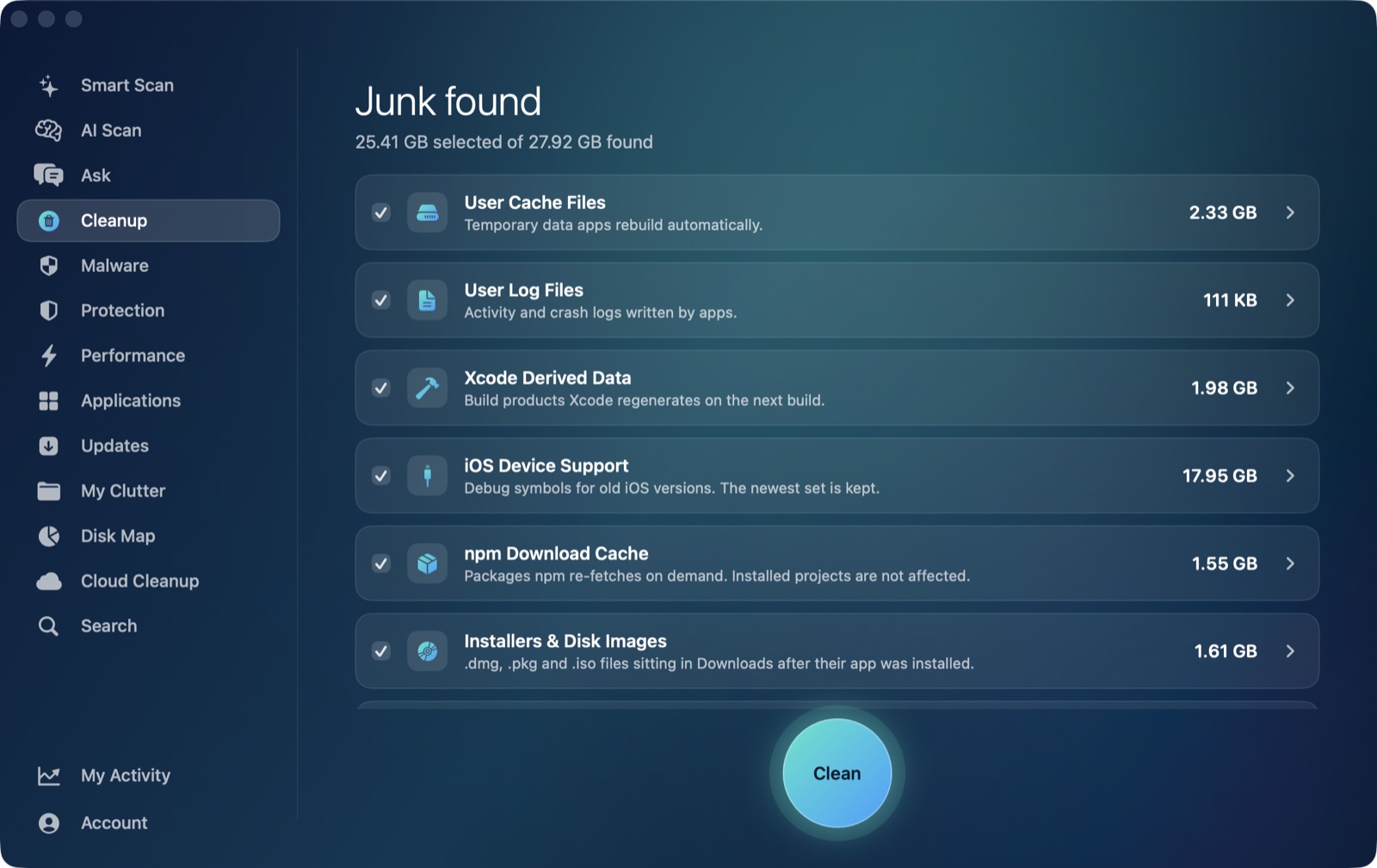
This is what the Cleanup module's installers & disk images category is for — one of its auto-clean-eligible categories, alongside user caches and logs, covering .dmg, .pkg and similar installer files sitting in Downloads once they've already done their job. Running that category together with user caches and logs after updating to Golden Gate clears the part of the problem that's genuinely yours to clear. The rollback snapshot itself is managed by macOS on its own schedule and isn't something a third-party cleaner should, or safely can, force — every category AI Mac Cleaner offers is listed by size before anything moves, and all removal goes through a Trash-only remover rather than deleting anything outright.
If your Mac feels slow rather than (or in addition to) tight on space after the same update, that's a separate symptom with its own causes — see the companion post on macos 27 performance issues, which covers the performance side without repeating this one. And if storage still looks wrong after working through the steps above, Mac storage still full after cleaning covers what to check when a cleanup itself doesn't seem to free the space it reports. If iCloud Drive is a big share of what's sitting there, why iCloud Drive is taking up space on your Mac covers the eviction fix for that specifically.
To see exactly what's sitting on your Mac after updating to Golden Gate — installers, caches, logs, all listed by size before anything moves — AI Mac Cleaner has a 7-day free trial with every feature unlocked and no card required, with plans from $6.99/mo after that.
Frequently asked questions
Why is my storage full right after updating to macOS 27 Golden Gate?
Like any major macOS update, Golden Gate needs free space to stage its installation, including a rollback snapshot it keeps as a safety net. That space is meant to be temporary and usually clears within a day or two, which is why storage can look tighter immediately after updating than it did before.
Does the macOS 27.0.1 update fix the storage issue?
27.0.1, released two weeks after Golden Gate itself on 28 September 2026, is the kind of point release that typically folds in fixes for issues reported after the initial wave of updates — it's worth having installed regardless, and checking for it is a reasonable step if storage still looks wrong several days after you updated to 27.0.
Is it safe to delete the Golden Gate installer file after updating?
Yes, once the update has finished successfully and you've confirmed everything is working. The installer package and any disk images you downloaded for it are exactly what the Cleanup module's installers & disk images category is meant to clear.
How is this different from the general "storage full after a macOS update" problem?
It's the same mechanism — installer staging and a rollback snapshot — but tied to this specific, dated release. If you want the version-agnostic version of this advice, see Mac storage full after macOS update; this post exists because Golden Gate is the particular update most people are searching about right now.
Can I speed up macOS clearing the rollback snapshot myself?
Not safely, and a cleaning app shouldn't try to force it on your behalf — it's managed automatically on a schedule macOS controls, the same way local Time Machine snapshots are. Giving it a day or two and clearing the categories that are genuinely yours to clear (installers, caches, logs) is the reliable approach.